About this Course
Welcome to the first of five courses in the Cisco Networking Basics Specialization. This course is developed by the Cisco Networking Academy. Cisco Networking Academy is an IT skills and career building program that connects millions of students, educators, and employers worldwide. Cisco partners with learning institutions worldwide to deliver technical training and problem-solving experiences to individuals studying networking, security, and IoT technologies. We've helped more than 6 million people prepare for IT careers since 1997. Have you ever wondered how you are able to open a web page from a server that is located in another country or how you are able to send documents and videos to the intended recipient without it going to the wrong device? In this course, you will be introduced to the fundamentals concepts of computer networking. More importantly, by the end of this course, you will understand how data travels in your home network. At the end of this course, you will be able to: 1. Explain how data networks work. 2. Define basic data networking terms. 3. Explain what is needed for devices to have network connectivity or Internet access. 4. Use the Cisco Packet Tracer simulation and modeling tool to build and test a small data network. 5. Identify the devices and component on your home network. 6. Build a simple peer-to-peer network.


최근에 저는  한국 시장에 특화된 HFT 시스템을 만들고 싶어졌습니다.
HFT가 한국에서는 불가능하다는 의견이 상당히 지배적이지만 그래도 도전을 해보고 싶습니다.
관련 자료가 너무 적어서 자료 검색에 어려움을 겪게 되네요.
관심이 생겨서 알게 된 내용들을 정리할 겸 공유하도록 하겠습니다.


고빈도 매매(High Frequency Trading)를 위한 준비 사항

Requirements for High Frequency Trading


1. 회사 등록 (Registering your company)

첫 번째 단계는 회사 등록을 하는 과정이 필요합니다. 
트레이딩 회사를 기업, 파트너쉽, LLP(Limited Liability Partnership) 혹은 개인으로 등록 할 수 있습니다. 만약 투자자들과 헤지펀드를 등록하기 위해서는 규제에 대한 승인과 법률에 대한 조항들을 통과해야 합니다.

2. 트레이딩에 필요한 자본 (Capital required for Trading for Operations)

거래비용만 본다면, HFT에 필요한 자본은 대개 LFT(Low-Frequency Trading)에 필요한 자본보다 적습니다. 그러나 트레이딩 작업 수행에 필요한 자본은 일반적으로 매우 비용이 더 많이듭니다. HFT의 경우에는 인프라와 기술이 아주 중요하게 작용하기 때문입니다.


3. 트레이딩 패러다임 (Trading Paradigm)


트레이딩 패러다임, 쉽게 말하면 모델 혹은 철학이라고 생각 할 수 있겠습니다. 
어떤 패러다임을 적용할 것인지 결정해야 합니다. 가장 일반적인 트레이딩 철학은 알파를 찾는 것에 초점을 맞추는 것보단 전략에 의해 최적의 가격을 찾는 것입니다. 
HFT 트레이딩 전략은 극도로 빠른 속도로 주문을 체결해야 합니다.
주로 시장 조성(Market making), 스캘핑(Scalping), 차익거래(Arbitrage)를 포함합니다.


4. 시장 접근 (Access to Market)


한국과 해외의 시장은 형태가 사뭇 다릅니다. 해외의 경우 간접 시장접속은 대면 거래를 말하지만 한국에서는 HTS라고 할 수 있습니다. 증권사가 만든 전자거래 시스템을 통하여 시장에 접근하기 때문입니다. 하지만 DMA(Direct Market Access)는 트레이더가 만든 전자거래시스템을 통하여 시장에 접근할 수 있습니다. DMA용 시스템을 개발 할 때 증권사가 제공하는 서비스는 대략 3가지 입니다.

1. 저지연 시세서비스(시세스위치에서 시세를 직접 수신하는 서비스)
2. 특화주문고객을 위하여 빠른 속도의 미니원장과 FEP 서비스
3. 원장시스템과의 연결 서비스

현재 DMA를 제공하는 국내 증권사 목록입니다. (변동 가능성 있습니다.)
KR선물
케이프투자증권
동부증권
유진투자선물
삼성선물
NH선물
현대선물주식회사
대신증권
이베스트투자증권
삼성증권
메리츠종금증권
미래에셋대우
SK증권
유안타증권
신한금융투자
한국투자증권
교보증권
하나금융투자
NH투자증권
하이투자증권

HFT 전략은 수수료에도 아주 민감하다는 점도 유의해야 합니다.


5. 인프라 구축 (Infrastructure Requirements)


중점을 둬야 할 부분은 장소 배치, 하드웨어, 네트워크 장비, 네트워크 선입니다.

a) 장소 배치 (Colocation)


장소배치는 서버가 증권사 네트워크가 있는 곳과 같은 구역에 있어야 한 다는 것을 의미합니다.
주문이 체결되는 부분에서 상당히 큰 부분으로 작용됩니다.

b) 하드웨어 (Hardware)


많은 기업들은 알고리즘 트레이딩을 위한 서버를 만듭니다.
하드웨어를 커스터마이징해서 퍼포먼스를 증가시키는 것도 가능합니다.


c) 네트워크 장비(Network Equipment)


여기서는 주로 라우터(Routers), 모뎀(Modems), 스위치(Switches) 그리고 네트워크 인터페이스 컨트롤러 (NICs)와 FPGA를 포함합니다. 

라우터와 모뎀은 거래소와 호환이 되는지 버전을 확인해야 합니다. 

NICs는 컴퓨터가 네트워크에 연결되는 것을 돕는 이더넷 카드(Ethernet cards)입니다.

FGPA는 Field-Programmable Gate Array의 약자입니다. HDL(hardware description language)로 프로그래밍이 가능한 집적 회로입니다. 일반적인 프로세서는 메모리에 있는 프로그램을 불러와서 CPU에서 해독하여 작업을 실행하지만 FGPA는 아예 프로세서 내부 회로를 직접 변경해서 특정 작업에 맞춘 프로세서입니다.

d) 네트워크 선(Network Lines)


1. 트레이딩 리스 선(Trading Lease Line)

거래소로 보내는 주문에 쓰이는 선입니다. 주문을 적절히 보내기 위해서 선마다 다른 대역폭을 제공합니다.

2. 마켓 데이터 리스 선(Market Data Lease Line)

이 선은 마켓 데이터를 받는데에 쓰입니다. 마켓 데이터를 받는 방법에는 두 가지 방법이 있습니다.
아래와 같습니다.

-> Tick By Tick (TBT)
틱 데이터는 연속적인 틱들의 집합입니다. "틱"은 가장 최근에 일어난 주문에 대한 정보입니다.
크게 호가정보, 체결정보, 체결+호가정보로 구분됩니다.
호가정보는 각 호가(Order Book)의 가격, 잔량, 주문 건수 등의 정보를 포함합니다.
체결정보는 시장가 주문의 체결가격과, 체결수량, 그리고 누적 체결수량 등의 정보를 포함합니다.  


-> 스냅샷 데이터(Snapshot Data)
스냅샷 데이터는 거래소나 증권사의 저장되어있는 저장 장치에서 데이터를 받아오는 것입니다.
틱데이터와 달리 일정한 시간 간격을 두고 생성된다는 점이 특징입니다.

3. 거래소들과 연결 (Lines between Exchanges)

이것은 Smart Order Routing 이라고 불리는 SOR을 사용합니다. SOR은 여러 거래소에 주문을 낼 수 있도록 합니다. 하지만 이것은 거래소간 가격이 다른 해외 거래소를 사용하는 경우에 필요하다고 볼 수 있겠습니다.


6. 알고리즘 트레이딩 플랫폼(Algorithmic Trading Platform)

알고리즘 트레이딩 플랫폼은 주로 세가지로 나눠집니다.

a) 마켓 데이터 어댑터 (Market Data Adapter)

MDA는 거래소 데이터를 받고 트레이딩 시스템이 사용가능하도록 포맷을 변환합니다.

b) 복잡한 이벤트 처리 엔진 (Complex Events Processing Engine)

CEP는 주요 전략이 들어있는 시스템의 뇌 같은 역할을 합니다.

c) 오더 라우팅 시스템 (Order Routing System)

CEP가 변환한 포맷으로 정보를 ORS에 보냅니다. FIX는 거래소에서 가장 널리 쓰이는 포맷입니다.  FIX는 주식, 선물, 옵션, 채권 등 다양한 금융 상품들을 거래하기 위한 표준 프로토콜입니다.
금융 상품 거래의 참여자들간의 통신을 표준화 해주는 역할을 합니다.

7. 백테스팅 (Backtesting)

백테스팅은 과거의 정보를 토대로 시뮬레이션을 수행하여 퍼포먼스를 확인하는 것입니다.
대부분의 ATP(Arbitrage Trading Program)의 백테스팅 플랫폼은 백테스트 데이터 기간의 
수익&손실, 위험, 퍼포먼스 통계을 결과값으로 얻도록 사용합니다.
그 다음 전략을 "테스트 마켓"에서 사용하여 실제 시장에서 사용 할 때 기술적으로 결함이 없는지를 확인합니다.


8. 리스크 매니지먼트 (Risk Management)

리스크 매니지먼트는 일반적으로 시장 위험을 모니터링하는데에 중점을 둡니다.
그러나 HTF에서는 조작상의 위험이 더 위험합니다. 
기술, 네트워크, 데이터 입출력의 결함은 재앙이 될 수 있습니다.
그렇기 때문에 수 차례에 걸쳐 데이터나 다른 예외 사항을 잡아 내고 
뭔가 잘못 되었을 때 전략을 즉시 정지 할 수 있도록 만들어야 합니다. 
수 초간의 거래가 큰 손실로 이뤄지기 때문에 중요한 부분입니다.


이상 10가지의 준비사항들에 대해 알아보았습니다.
다음 시간에는 5번에 해당되는 인프라 구축에서 NIC와 제가 언급하진 않았지만
추가적으로 고려중인 RDMA와 TOE에 대해서 알아보도록 하겠습니다.
아무래도 속도의 싸움인 HFT이기 때문에 이런 부분에 대해서 알아두면 좋을 것 같습니다.


1. Intro

Making commits to a repository can be nerve wracking.

In this lesson we'll look at git commit --amend,
git revert, and git reset.

With git commit --amend, you can alter the most recent commit.
You'd wan to do this if you forgot to include a file in the commit or had a typo in the commit message.

With git revert, you provide it the SHA of the conmmit that you want reverted.
The changes that were made in that commit are reversed.
So lines that were added in the commit will be deleted.

With git reset, you can actually delete commits.
Now you can't delete just any commit.
You have to delete commits in order.
But this is a potentially dangerous command.

2. Modifying The Last Commit

Changing The Last Commit

You've already made plenty of commits with the git commit command. Now with the --amend flag, you can alter the most-recent commit.
$ git commit --amend
If your Working Directory is clean (meaning there aren't any uncommitted changes in the repository), then running git commit --amend will let you provide a new commit message. Your code editor will open up and display the original commit message. Just fix a misspelling or completely reword it! Then save it and close the editor to lock in the new commit message.

Add Forgotten Files To Commit

Alternatively, git commit --amend will let you include files (or changes to files) you might've forgotten to include. Let's say you've updated the color of all navigation links across your entire website. You committed that change and thought you were done. But then you discovered that a special nav link buried deep on a page doesn't have the new color. You could just make a new commit that updates the color for that one link, but that would have two back-to-back commits that do practically the exact same thing (change link colors).
Instead, you can amend the last commit (the one that updated the color of all of the other links) to include this forgotten one. To do get the forgotten link included, just:
  • edit the file(s)
  • save the file(s)
  • stage the file(s)
  • and run git commit --amend
So you'd make changes to the necessary CSS and/or HTML files to get the forgotten link styled correctly, then you'd save all of the files that were modified, then you'd use git add to stage all of the modified files (just as if you were going to make a new commit!), but then you'd run git commit --amend to update the most-recent commit instead of creating a new one.

3. Reverting A Commit

What Is A Revert?

When you tell Git to revert a specific commit, Git takes the changes that were made in commit and does the exact opposite of them. Let's break that down a bit. If a character is added in commit A, if Git reverts commit A, then Git will make a new commit where that character is deleted. It also works the other way where if a character/line is removed, then reverting that commit will add that content back!
We ended the previous lesson with a merge conflict and resolved that conflict by setting the heading to Adventurous Quest. Let's say that there's a commit in your repository that changes the heading now to Quests & Crusades.

The git revert Command

Now that I've made a commit with some changes, I can revert it with the git revertcommand
$ git revert 
Since the SHA of the most-recent commit is db7e87a, to revert it: I'll just run git revert db7e87a (this will pop open my code editor to edit/accept the provided commit message)
I'll get the following output:
Did you see how the output of the git revert command tells us what it reverted? It uses the commit message of the commit that I told it to revert. Something that's also important is that it creates a new commit.

Revert Recap

To recap, the git revert command is used to reverse a previously made commit:
$ git revert 
This command:
  • will undo the changes that were made by the provided commit
  • creates a new commit to record the change

Further Research

4. Resetting Commits

Reset vs Revert

At first glance, resetting might seem coincidentally close to reverting, but they are actually quite different. Reverting creates a new commit that reverts or undos a previous commit. Resetting, on the other hand, erases commits!

⚠️ Resetting Is Dangerous ⚠️

You've got to be careful with Git's resetting capabilities. This is one of the few commands that lets you erase commits from the repository. If a commit is no longer in the repository, then its content is gone.
To alleviate the stress a bit, Git does keep track of everything for about 30 days before it completely erases anything. To access this content, you'll need to use the git reflog command. Check out these links for more info:

Relative Commit References

You already know that you can reference commits by their SHA, by tags, branches, and the special HEAD pointer. Sometimes that's not enough, though. There will be times when you'll want to reference a commit relative to another commit. For example, there will be times where you'll want to tell Git about the commit that's one before the current commit...or two before the current commit. There are special characters called "Ancestry References" that we can use to tell Git about these relative references. Those characters are:
  • ^ – indicates the parent commit
  • ~ – indicates the first parent commit
Here's how we can refer to previous commits:
  • the parent commit – the following indicate the parent commit of the current commit
    • HEAD^
    • HEAD~
    • HEAD~1
  • the grandparent commit – the following indicate the grandparent commit of the current commit
    • HEAD^^
    • HEAD~2
  • the great-grandparent commit – the following indicate the great-grandparent commit of the current commit
    • HEAD^^^
    • HEAD~3
The main difference between the ^ and the ~ is when a commit is created from a merge. A merge commit has two parents. With a merge commit, the ^ reference is used to indicate the first parent of the commit while ^2 indicates the second parent. The first parent is the branch you were on when you ran git merge while the second parent is the branch that was merged in.
It's easier if we look at an example. This what my git log currently shows:
* 9ec05ca (HEAD -> master) Revert "Set page heading to "Quests & Crusades""
* db7e87a Set page heading to "Quests & Crusades"
*   796ddb0 Merge branch 'heading-update'
|\  
| * 4c9749e (heading-update) Set page heading to "Crusade"
* | 0c5975a Set page heading to "Quest"
|/  
*   1a56a81 Merge branch 'sidebar'
|\  
| * f69811c (sidebar) Update sidebar with favorite movie
| * e6c65a6 Add new sidebar content
* | e014d91 (footer) Add links to social media
* | 209752a Improve site heading for SEO
* | 3772ab1 Set background color for page
|/  
* 5bfe5e7 Add starting HTML structure
* 6fa5f34 Add .gitignore file
* a879849 Add header to blog
* 94de470 Initial commit
Let's look at how we'd refer to some of the previous commits. Since HEAD points to the 9ec05ca commt:
  • HEAD^ is the db7e87a commit
  • HEAD~1 is also the db7e87a commit
  • HEAD^^ is the 796ddb0 commit
  • HEAD~2 is also the 796ddb0 commit
  • HEAD^^^ is the 0c5975a commit
  • HEAD~3 is also the 0c5975a commit
  • HEAD^^^2 is the 4c9749e commit (this is the grandparent's (HEAD^^) second parent (^2))

Which Commit?

Use this repository to answer the following quiz questions:
* 9ec05ca (HEAD -> master) Revert "Set page heading to "Quests & Crusades""
* db7e87a Set page heading to "Quests & Crusades"
*   796ddb0 Merge branch 'heading-update'
|\  
| * 4c9749e (heading-update) Set page heading to "Crusade"
* | 0c5975a Set page heading to "Quest"
|/  
*   1a56a81 Merge branch 'sidebar'
|\  
| * f69811c (sidebar) Update sidebar with favorite movie
| * e6c65a6 Add new sidebar content
* | e014d91 (footer) Add links to social media
* | 209752a Improve site heading for SEO
* | 3772ab1 Set background color for page
|/  
* 5bfe5e7 Add starting HTML structure
* 6fa5f34 Add .gitignore file
* a879849 Add header to blog
* 94de470 Initial commit

The git reset Command

The git reset command is used to reset (erase) commits:
$ git reset 
It can be used to:
  • move the HEAD and current branch pointer to the referenced commit
  • erase commits
  • move committed changes to the staging index
  • unstage committed changes

Git Reset's Flags

The way that Git determines if it erases, stages previously committed changes, or unstages previously committed changes is by the flag that's used. The flags are:
  • --mixed
  • --soft
  • --hard
It's easier to understand how they work with a little animation.

💡 Backup Branch 💡

Remember that using the git reset command will erase commits from the current branch. So if you want to follow along with all the resetting stuff that's coming up, you'll need to create a branch on the current commit that you can use as a backup.
Before I do any resetting, I usually create a backup branch on the most-recent commit so that I can get back to the commits if I make a mistake:
$ git branch backup

Reset's --mixed Flag

Let's look at each one of these flags.
* 9ec05ca (HEAD -> master) Revert "Set page heading to "Quests & Crusades""
* db7e87a Set page heading to "Quests & Crusades"
* 796ddb0 Merge branch 'heading-update'
Using the sample repo above with HEAD pointing to master on commit 9ec05ca, running git reset --mixed HEAD^ will take the changes made in commit 9ec05caand move them to the working directory.

💡 Back To Normal 💡

If you created the backup branch prior to resetting anything, then you can easily get back to having the master branch point to the same commit as the backupbranch. You'll just need to:
  1. remove the uncommitted changes from the working directory
  2. merge backup into master (which will cause a Fast-forward merge and move master up to the same point as backup)
$ git checkout -- index.html
$ git merge backup

Reset's --soft Flag

Let's use the same few commits and look at how the --soft flag works:
* 9ec05ca (HEAD -> master) Revert "Set page heading to "Quests & Crusades""
* db7e87a Set page heading to "Quests & Crusades"
* 796ddb0 Merge branch 'heading-update'
Running git reset --soft HEAD^ will take the changes made in commit 9ec05ca and move them directly to the Staging Index.

Reset's --hard Flag

Last but not least, let's look at the --hard flag:
* 9ec05ca (HEAD -> master) Revert "Set page heading to "Quests & Crusades""
* db7e87a Set page heading to "Quests & Crusades"
* 796ddb0 Merge branch 'heading-update'
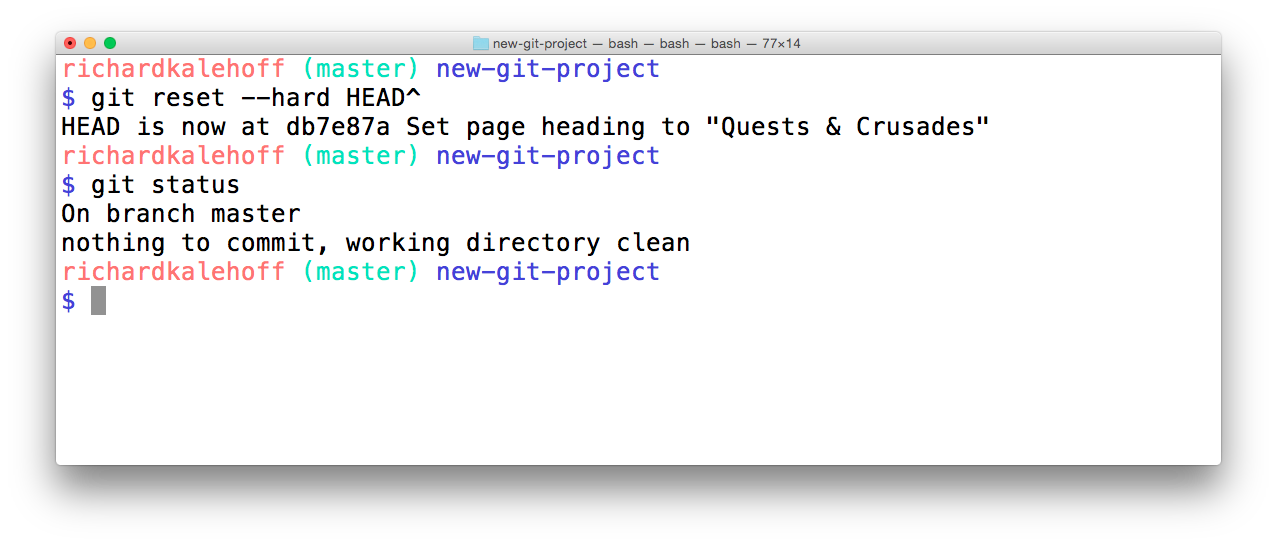
Running git reset --hard HEAD^ will take the changes made in commit 9ec05ca and erases them.
Now it's your turn!
Refer to the following repository:
* e014d91 (HEAD -> master, footer) Add links to social media
* 209752a Improve site heading for SEO
* 3772ab1 Set background color for page
* 5bfe5e7 Add starting HTML structure
* 6fa5f34 Add .gitignore file
* a879849 Add header to blog
* 94de470 Initial commit

Reset Recap

To recap, the git reset command is used erase commits:
$ git reset 
It can be used to:
  • move the HEAD and current branch pointer to the referenced commit
  • erase commits with the --hard flag
  • moves committed changes to the staging index with the --soft flag
  • unstages committed changes --mixed flag
Typically, ancestry references are used to indicate previous commits. The ancestry references are:
  • ^ – indicates the parent commit
  • ~ – indicates the first parent commit

Further Research


5. Lesson Outro

We look that git commits --amend flag to reword or update the most recent commit.
We looked at the git revert command to undo a specific commit, and we just looked at the git reset command to reset or erase changes, but remember be careful with that last one.

Knowing how to fix mistakes definitely gave me the confidence to experiment, and hope you
more confident making changes now that you know how undo them.

6. Course Outro


Expand On Your Git Skills

  • take the companion GitHub course
  • create a repo to track your computer's settings - https://dotfiles.github.io/
  • develop the next, awesome feature for your personal project
  • try tackling some Git challenges with the Git-it app